Overcomplete structure, 150% BOM, EBOM, MBOM, BOR, PDM, PLM, these words come up in every working group, and rarely does everyone mean the same thing. Here is the landscape in plain language, plus the answer to the question that matters most. What do you really need in order to sell?
RulePro connects product choices to your existing structures
The overcomplete structure (150%)
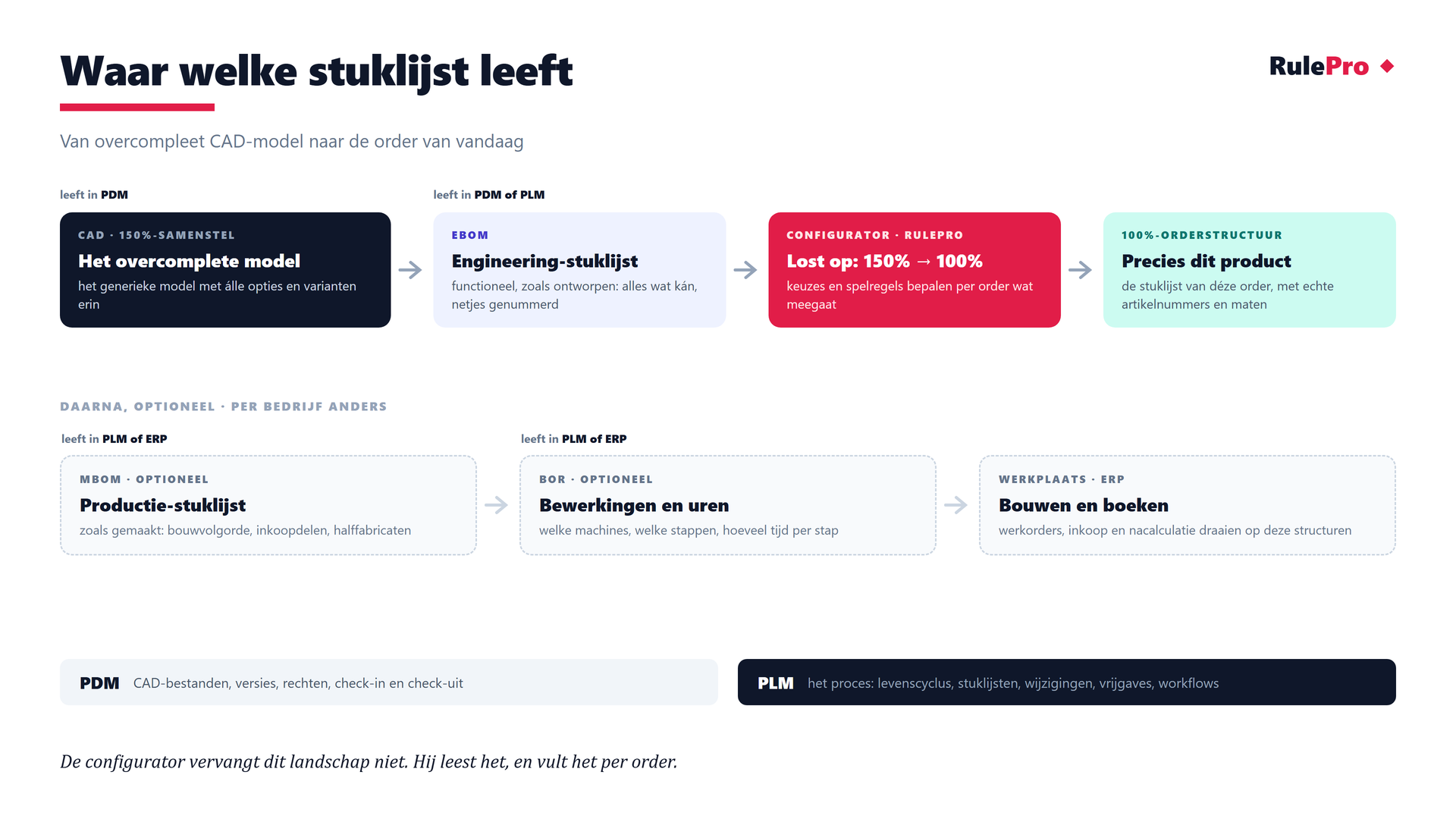
Some companies manage a generic, overcomplete model in CAD, PDM or PLM. That is a structure holding every known option and variant. One world calls this the 150% structure. Another says super BOM, generic bill of materials or configurable BOM. The idea is always the same. One structure describes everything that is possible and each order picks one build from it. No physical product looks exactly like it: it is the collection of everything that can be. Not every company has such a model fully worked out already. You can also start with a product line whose main choices and definitions are clear. Where a 150% structure exists, the configurator resolves it into a 100% bill of materials for each order. That is the bill of materials for exactly this build. The right part numbers, the right dimensions, nothing missing and nothing extra. Production can start right away.
The EBOM, the engineering bill of materials
The EBOM describes the product as designed. Functionally grouped, properly numbered. It lives in PDM or PLM and is an important reference for the configurator. Which bill of materials takes the lead is a choice in how you work. If PLM is your backbone, the EBOM is usually the starting point. If your ERP is the backbone, for example with SAP variant configuration or systems like Ridder and Isah, the 150% structure often lives on the production side as a super BOM and the routing carries just as much weight. Both ways of working are fine. RulePro connects wherever your 150% structure lives. You do not need to have every detail worked out. Start with a product whose definitions and frequently sold variants are clear, then expand the model step by step.
The MBOM, the manufacturing BOM (optional in PLM)
The MBOM describes the product as built. Build sequence, purchased parts, semi-finished goods, phantom assemblies. Some companies manage it in PLM (with an EBOM-to-MBOM transformation); others let the ERP derive it. Both are fine, it differs per company, and the configurator works with either.
The BOR, operations and hours (optional in PLM)
The BOR (bill of resources) describes how the product is made. In most ERP systems this is simply called the routing. Which operations, on which machines, with how much time per step. Captured in PLM it becomes reusable per module, the 300 and the 400 drawer block share one routing with a different saw length. Often the BOR lives in the ERP. That is fine too. What matters is that the configurator can include the hours in the cost price.
PDM or PLM?
PDM focuses on CAD data and document management, including versions, permissions, check-in and check-out. PLM includes that data management and extends it with product lifecycle, BOMs, changes, releases and workflows. In some companies PDM is a separate solution. In others, PDM functions are part of the PLM system.
You do not need to wait until engineering has finished everything. Start with a frequently sold product line whose main definitions are clear. Sales can quote more standard products with it while engineering adds the next variants and rules to the model.
Pre-engineer or parametric? Three ways to deliver an assembly
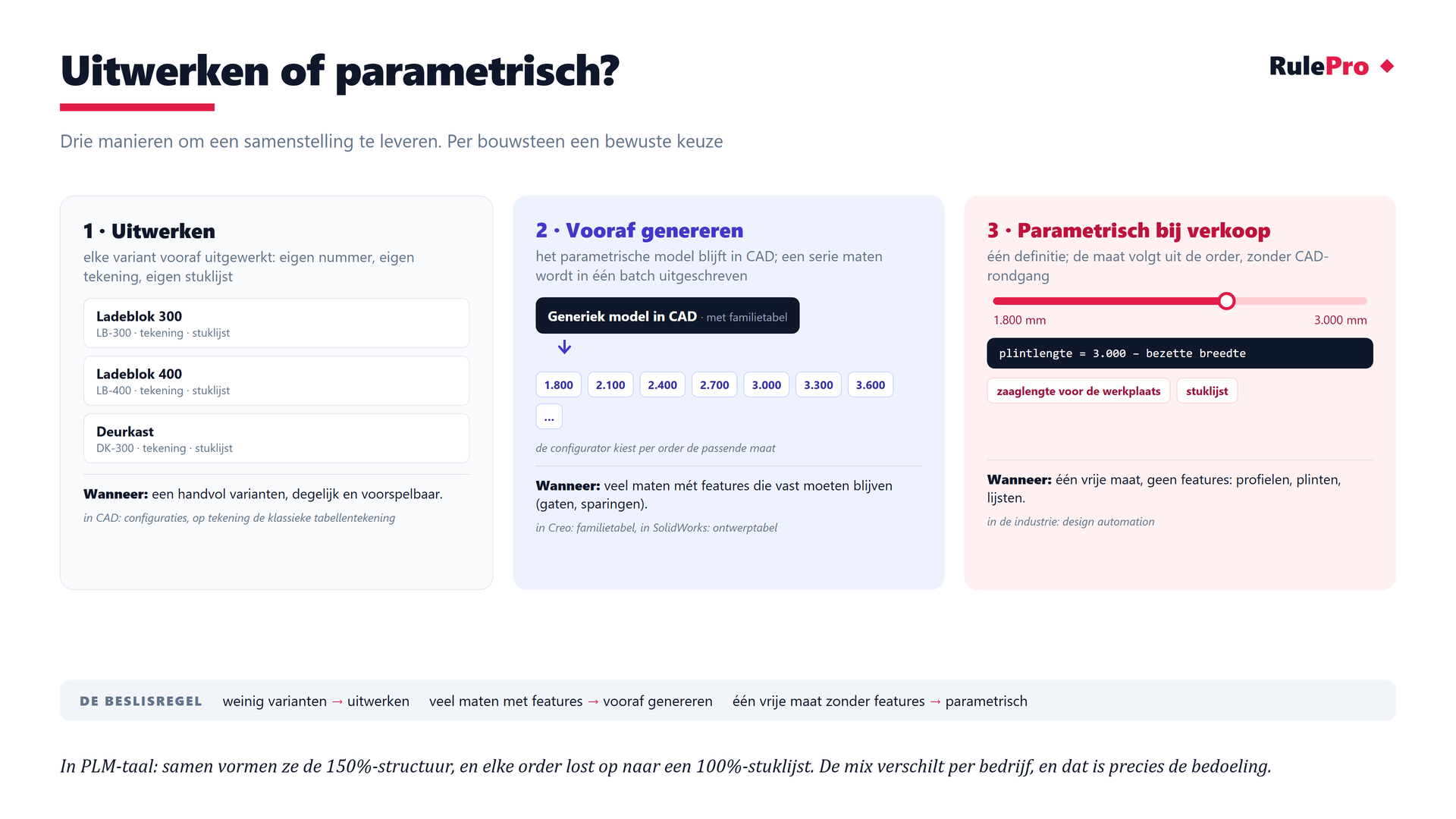
- Pre-engineerA handful of variants? Engineer them out, with an own number, drawing and BOM per variant. In CAD these are called configurations, on the drawing the classic tabulated drawing.
- Pre-generateMany sizes with critical features (holes, recesses)? Keep the parametric model in CAD and batch-generate a series of sizes with the family table (Creo) or design table (SolidWorks). The configurator picks the right one per order.
- Parametric at saleOne free dimension without features (profiles, skirtings, trims)? The dimension follows from the order. The system outputs a cut length and BOM without a CAD round-trip. Industry calls this design automation.
The decision rule is simple. Few variants → pre-engineer · many sizes with features → pre-generate · one free dimension without features → parametric. The trap is dogma. Engineering everything out yields thousands of articles, making everything parametric yields fragile automation. The mix keeps it manageable.
How much drawing does your sales process need?
Four possibilities. Choose the simplest representation sales needs.
- Level 0, no drawing. Price, quote and BOM. Many configurators pay for themselves right here.
- Level 1, an automatic 2D dimension drawing. Views with main dimensions, generated from the choices. Often exactly what the customer and the permit require, at a fraction of 3D.
- Level 2, light 3D in sales. Stretched profiles and surfaces show the product and catch gross collisions, without a CAD link.
- Level 3, CAD builds the assembly. After the order an automated step turns the choices into the complete 3D model under the project number, with collision checking and drawings.
Whichever level you pick, make clear which data source is leading for each use. Keep the sales representation and engineering geometry current through clear agreements.